C-90
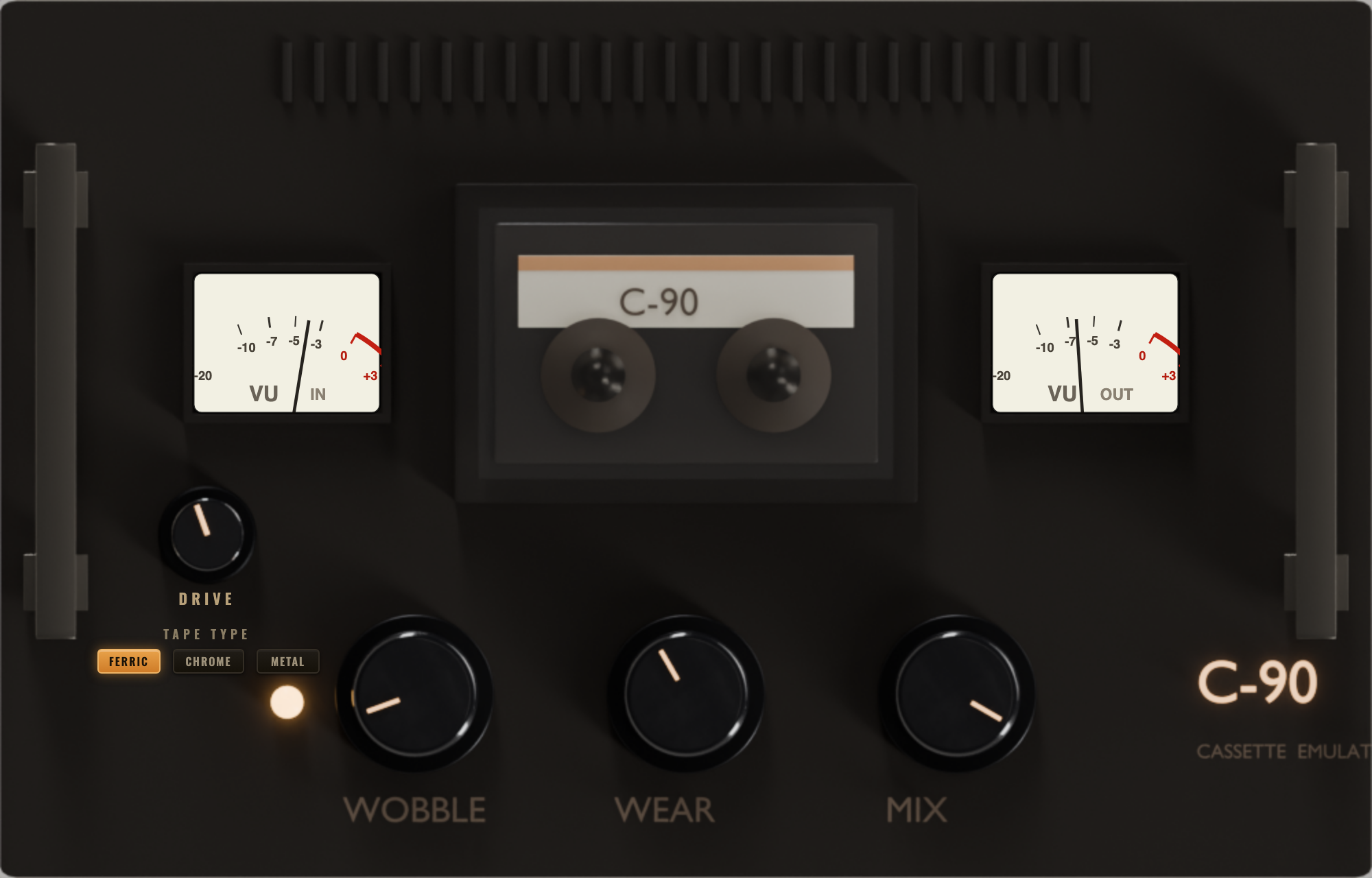
The cassette-tape emulator. Three controls — WOBBLE, WEAR and MIX — and one ENGAGE switch. This guide covers both the desktop plug-in and the C-90 built into the DEES TAPE apps.
Getting C-90 running
C-90 is a plug-in for your music software (your DAW), plus a standalone app on Mac. One license key works on up to 5 of your computers, across Mac and Windows.
Mac
Open the C-90-macOS.dmg you downloaded. Run the installer inside — it places the VST3 and the AudioUnit (AU) where Logic, Ableton, Reaper and the rest look for them. To use C-90 on its own, drag C-90.app into your Applications folder. It's one universal build — it runs natively on both Apple-silicon (M-series) and Intel Macs, and it's signed and notarized by Apple, so it opens with no security warnings.
Windows
Open the C-90-Windows.zip and copy C-90.vst3 into your VST3 folder (usually C:\Program Files\Common Files\VST3). Windows 10 or 11, 64-bit.
First launch
Start your DAW and rescan plug-ins if you don't see C-90 yet. Add it to a track, a bus or the master. The first open starts your 14-day free trial — the full plug-in, no account, no card.
Not sure which Mac you have? Apple menu > About This Mac — Chip: Apple M… is Apple silicon, Processor: Intel is Intel. The universal build runs on both, so either way the one download is correct.
What C-90 does
C-90 runs your audio through a model of a worn cassette deck. Real tape — especially a cheap C-90 cassette that's been played a hundred times — never sounds perfectly clean: the pitch drifts and shimmers, the top end softens, the sound saturates and compresses, and there's a layer of hiss underneath. C-90 gives you all of that from a handful of controls, so you can take the sterile edge off anything digital, or push it all the way to a broken-tape sound.
Put it on a single track for character, on a bus to glue a group together with tape, or on the master for an all-over vintage feel. It works in mono and in stereo.
WOBBLE · WEAR · DRIVE · TAPE TYPE · MIX
| Control | What it does | In plain terms |
|---|---|---|
| WOBBLE | Wow & flutter — slow pitch drift plus faster shimmer, like a tape transport with a tired motor and pinch-roller. | How much the pitch moves. Low = steady. High = warped, seasick tape. Most audible on held notes, pads and vocals. |
| WEAR | Tape age in one knob: high-frequency roll-off, tape saturation and gentle compression, and cassette hiss fading in as you turn it up. | How old and tired the tape is. Low = fresh, clean. High = dark, crunchy, hissy — a tenth-generation dub. |
| DRIVE | Input level into the tape. Pushes the record head so it saturates and compresses — the warm thickening of printing hot. | How hard you hit the tape. Low = clean and faithful. High = pushed, fat, a little squashed. (WEAR ages the tape; DRIVE is how loud you record onto it.) |
| TAPE TYPE | Switches the cassette formulation: Ferric (Type I), Chrome (Type II) or Metal (Type IV). Each changes the voicing, headroom and hiss floor. | Which cassette it is. Ferric = warm, rolled-off. Chrome = brighter, cleaner, less hiss. Metal = hi-fi, most headroom, least colour. |
| MIX | Dry/wet blend. The dry path is time-aligned to the tape path so a blend stays in phase instead of hollowing out. | How much tape vs. your original. 100% = all cassette. Pull back to keep the punch of the dry track and let the tape sit under it. |
A good way to learn it: pick a TAPE TYPE, set MIX to 100% so you hear only the tape, dial WOBBLE, WEAR and DRIVE to taste, then pull MIX back until it sits right in the track.
The three tape types
Ferric · Type I
The classic home-taped cassette: warm, soft on top, the most obvious “tape” colour. Reach for it when you want the sound to feel old and lo-fi.
Chrome · Type II
Brighter and cleaner with a crisper high end and a lower hiss floor. The middle ground — character without going murky. A safe everyday choice.
Metal · Type IV
The hi-fi tape: the most headroom, the tightest low end and the least colour. Use it when you want tape movement and glue but not much grit.
ENGAGE — the amber lamp
The small amber lamp beside the knobs is ENGAGE: it runs the tape transport. Click it to turn C-90 on and off.
Lamp lit — tape running
The reels spin and C-90 is processing. When you switch it on, the transport spins up with a tiny wow-in — the gentle pitch rise a real deck makes as it gets up to speed — so turning it on mid-phrase sounds like hitting play on a cassette.
Lamp off — clean bypass
The signal passes straight through, untouched. Because C-90 stays in your chain, you can flick ENGAGE to A/B the tape against the dry sound without removing the plug-in — the fair way to judge how much it's really doing.
Tip: use your DAW's own bypass for a hard, instant on/off; use ENGAGE when you want the musical wow-in as the tape starts. Inside the DEES TAPE apps the same on/off is the effect's power toggle on the FX rack.
From a hint to a wreck
Knob positions below are a starting point, not a rule — trust your ears and the track. Percentages are roughly where the knob points (fully left = 0%, fully right = 100%).
Subtle warble
The everyday setting — takes the digital stiffness off a synth, a piano or a backing vocal without anyone noticing a “tape effect”.
- Wobble 15%
- Wear 20%
- Drive low
- Chrome
- Mix 35%
Warm & glued bus
On a drum or mix bus: a little movement, a little tape softness, a touch of drive, low blend so the punch survives.
- Wobble 25%
- Wear 40%
- Drive ~30%
- Chrome
- Mix 45%
Dark, stable tape
Lots of age, almost no wobble — a rounded, saturated, hiss-tinged sound that still holds pitch. Good on harsh digital sources.
- Wobble 10%
- Wear 70%
- Drive ~40%
- Ferric
- Mix 60%
Seasick lo-fi
Clear pitch-wobble with little grime — strong wow and flutter, light wear. The classic woozy-tape loop feel.
- Wobble 70%
- Wear 25%
- Drive low
- Chrome
- Mix 80%
Destroyed tape
Everything maxed — lurching pitch, no top end, hiss and saturation everywhere. A loop that sounds found, not made. Great on beats and samples.
- Wobble 80%
- Wear 90%
- Drive high
- Ferric
- Mix 100%
Clean hi-fi glue
Tape movement and cohesion with very little grit — Metal tape and low wear. On a mix or master when you want life, not lo-fi.
- Wobble 8%
- Wear 25%
- Drive ~20%
- Metal
- Mix 50%
The same tape, no extra install
C-90 isn't only the desktop plug-in — the identical cassette engine is built into DEES TAPE on iPhone and Android and into DEES TAPE for Mac & PC. If you already use DEES TAPE, you have C-90 there with nothing to download.
DEES TAPE on your phone
C-90 is a PRO feature in DEES TAPE. With Pro unlocked, open a track's FX rack and add the C-90 (cassette) effect — the same controls, WOBBLE, WEAR, DRIVE, TAPE TYPE and MIX, with a power toggle for on/off. Dial it with DIRECT monitoring on so you hear it live, then record: the tape prints into the track's FX file while your RAW take stays untouched.
DEES TAPE Desktop
With DEES TAPE PRO, C-90 is one of the built-in rack units — drop it on any track or the master. You can also load the standalone C-90 plug-in into the Desktop's VST BOX after a SCAN, exactly like any other VST3 or AU.
Two separate purchases
Your C-90 plug-in license is for your DAW and the standalone app. C-90 inside DEES TAPE comes with DEES TAPE PRO. Buying one doesn't unlock the other — and you don't need the plug-in to use the built-in C-90, or DEES TAPE to use the plug-in.
Trial, demo, PRO
Trial — 14 days
The full plug-in from first open. No account, no card.
Demo — after 14 days
Still fully working, with a 3-second dip to bypass every 40 seconds. Sessions and settings are untouched.
PRO — $29 once
Paste your C9PRO-… key and the dips stop for good. One key, up to 5 computers, free updates to C-90 1.x.
Buy on the C-90 page
Your key appears right after PayPal on the C-90 page, and is kept under your PayPal email and order id.
Activate in the plug-in
Open C-90, click the TRIAL or DEMO button in the top right, paste the whole key, click ACTIVATE. It checks in once, then works offline in every host.
Moving computers
Up to 5 at once. To free a seat: in the plug-in, LICENSED → DEACTIVATE THIS COMPUTER. Lost a machine for good? Email support and we'll free it.
Stuck on something?
C-90 doesn't appear in your DAW? Rescan your plug-ins, and on Mac make sure the installer finished (the VST3 and AU go into your system plug-in folders). Can't find your key? Use Find my key with your PayPal email and order id. Anything else, a real person reads c90@deestechholdings.com.
Warped, worn, warm.
That's the whole deck — five knobs, a tape-type switch and a lamp.