The four-track. Now on your desk.
The same machine as the phone app, plus a VST BOX that hosts your plugins on every track and the master, and the same SPLIT key as the phone — four stems, on your computer, nothing uploaded. Every take prints twice — raw and FX — in 32-bit float. Nothing you record ever gets overwritten.
Which Mac do you have? Apple menu > About This Mac: Chip: Apple M… means Apple silicon, Processor: Intel means Intel. Needs macOS 11 Big Sur or later. Not sure? Get the universal build, it runs on both.
Free: 4 tracks, one stem split. PRO: 10 tracks, unlimited splits, $29 once, for life. See FREE vs PRO ↓ · Looking for the pocket version? DEES TAPE for iPhone & Android →
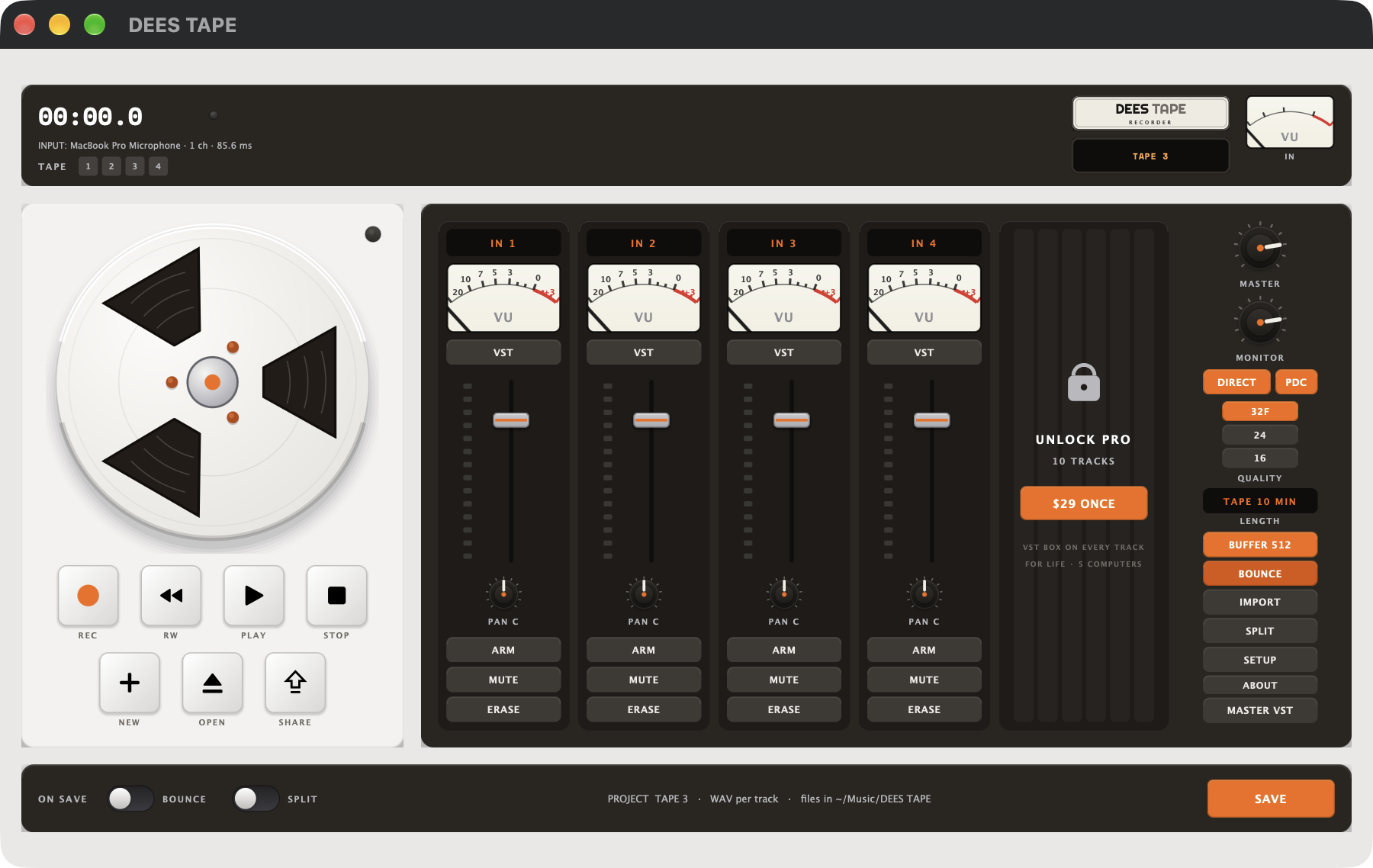
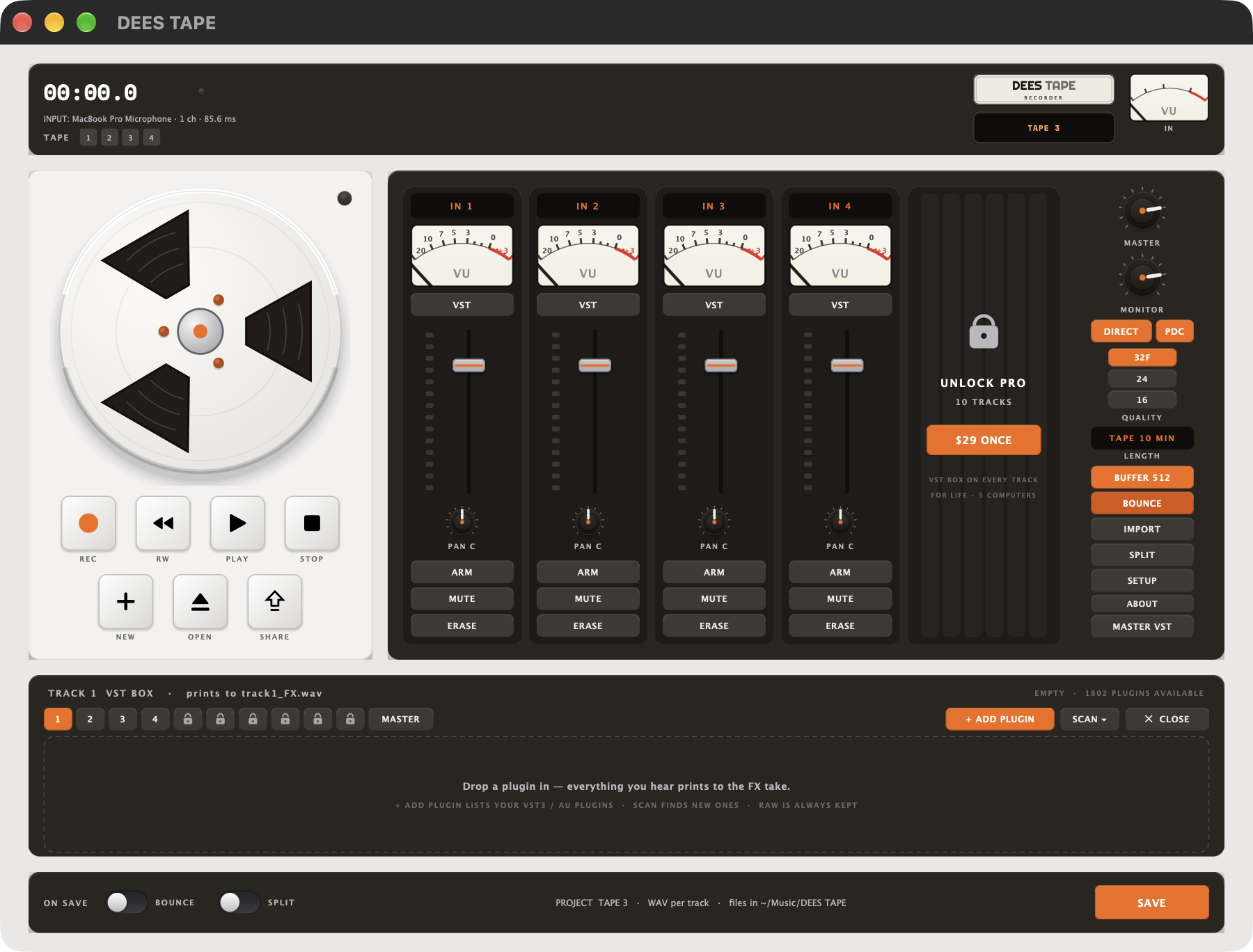
Same machine. Bigger desk.
What you getYour plugins, on every track
An expanding rack on each track and on the master. Hosts VST3 on Mac and Windows, AudioUnit on Mac. Deestech's own effects are built in, no scan needed — all 12: Deestress Comp, LA-D, D'Master, Vintage Delay, Preamp, De-Ess, Dimension, Spring, 6-Band EQ, Gate, Tape Saturator and CLEAN Air, each with its own hardware-style panel. Drag slots to reorder (or onto another track's tab), and plugin delay compensation keeps every track aligned with a live latency readout. Everything you hear through it prints to the FX take.
Drums, bass, vocals, instruments
The same four-stem splitter as the phone app — DRUMS · BASS · VOCALS · INSTR — running on your computer, nothing uploaded. Press SPLIT to split the mix or any single track; flip ON SAVE SPLIT on and every SAVE prints the stems automatically.
RAW and FX, every time
Each track lands as track#_raw.wav and track#_FX.wav — commit to a sound while you track without losing the take underneath.
32-bit float, 24 or 16
WAV throughout, mono per track, rendered offline through your chain on SAVE. Flip ON SAVE BOUNCE on and you get a stereo mix.wav too.
Tape rules, not DAW rules
REC from the head; recording over audio erases what's under it. STOP parks, RW rewinds. Arm an empty track and overdub while the rest play.
Any interface, any input
Pick a device input per track — IN 1, IN 2, up to 16. DIRECT on to hear the live input through the track's VST BOX while you set gain.
Unlimited, and yours
Every project is a folder of plain WAVs plus a project.json in ~/Music/DEES TAPE. Open it in any DAW. Nothing is uploaded, no account.
FREE vs PRO
One-time, not a subscription| FREE | PRO | |
|---|---|---|
| Tracks | 4 | ✓10 |
| VST BOX | ✓every track + master | ✓every track + master |
| Raw + FX printing | ✓every take | ✓every take |
| 32-bit float | ✓ | ✓ |
| Projects | ✓unlimited | ✓unlimited |
| Stem split | 1 free split | ✓unlimited |
| Tape length | up to 20 min | ✓∞ — unlimited |
| Computers | — | ✓up to 5, one key |
| Price | $0 | $29 once, for life |
- Includes a free paid plug-in — your pick of CLEAN Air, Neo TUBE, C-90 or Chubby Tube. We email your code within a day of your purchase.
- 10 tracks instead of 4 — the VST BOX on all of them
- Unlimited stem splits — DRUMS · BASS · VOCALS · INSTR, on-device (FREE includes one)
- One key, up to 5 of your computers, Mac or PC
- Paid once. No subscription, no account, no renewals
- Your key appears right here after PayPal — and we keep a copy under your PayPal email and order id
Connecting checkout…
Payment went through — the key is still on its way.
PayPal order . Retrying re-uses this order — you are never charged twice. Still stuck? deestape@deestechholdings.com with that order id. Start a new purchase instead.
Your PRO key
Issued to your PayPal email — save this somewhere safe.
Open the app, click PRO, paste, ACTIVATE. The app checks in with deestechholdings.com once, then the unlock lives on that computer. Same key on up to 5 computers.
PayPal order — keep it with the key. Your PayPal email plus this order id (or the Transaction ID on the receipt) brings the full key back in Find my key.
Bought PRO before? Get your key back.
Enter the email you paid with on PayPal and the order id or Transaction ID from your PayPal receipt, and we'll show the full DEES TAPE Desktop PRO key for that purchase.
Email only? We'll show which keys are on file (partly hidden) and when they were issued — the full key needs the order id, so nobody who merely knows your email can take your seats. The order id and Transaction ID are both in the PayPal receipt email and under Activity in your PayPal account.
How activation works
5 computers per keyBuy PRO, get your key
Your
DTPRO-…key shows up on this page the moment PayPal completes. It's also kept under your PayPal email and order id for “Find my key”.Paste it in the app and ACTIVATE
Open DEES TAPE, click PRO (the UNLOCK PRO plate next to track 4), paste the whole key, click ACTIVATE PRO. The app checks in with deestechholdings.com once and stores an activation for that computer — after that PRO works offline.
Up to 5 computers
Same key on your studio Mac, the laptop, the PC in the rehearsal room — up to five at once. A computer you've already activated never uses a second seat.
Moving on? Deactivate to free a seat
In the app, PRO → DEACTIVATE THIS COMPUTER. That seat opens up for the next machine. Old computer gone for good? Email deestape@deestechholdings.com and we'll free it.
Yes. 4 tracks, the VST BOX on every track and the master, raw + FX printing, 32-bit float, unlimited projects, and one stem split. No time limit, no watermark, no account. PRO adds tracks 5–10 and unlimited splits.
VST3 on Mac and Windows, and AudioUnit (AU) on Mac. Click SCAN in the drawer once and it finds what's in the standard plugin folders. A plugin that crashes during a scan is skipped next time, not the whole scan.
It's the same four-stem splitter as the phone app: DRUMS, BASS, VOCALS and INSTR. Press SPLIT to split the mix, or any single track, and the stems land as plain WAVs beside the project's takes. Turn ON SAVE SPLIT on and every SAVE prints the stems for you. It runs entirely on your computer — nothing is uploaded, no account. FREE includes one split; PRO makes it unlimited.
On your disk, in ~/Music/DEES TAPE/<project> — track1_raw.wav, track1_FX.wav and so on, plus mix.wav when ON SAVE BOUNCE is on. Plain WAVs any DAW can open. Nothing is uploaded, ever.
Only for the moment you activate or deactivate PRO. The app verifies your key and activation offline every launch; recording never touches the network.
The Windows build is on the site now; the Mac build goes up the moment Apple's notarization completes. Drop your email in the “get notified” box at the top and you'll get one message when it's up.
Use Find my key with the email you paid with on PayPal plus the order id or Transaction ID from your PayPal receipt. Still stuck? deestape@deestechholdings.com — a real person reads every message.
No. $29 once, for life. No renewals, no account, no “pro plan”. If the app ever asks you to pay again, it isn't ours.
Email deestape@deestechholdings.com with your PayPal receipt or order id. We'll sort it.
Music videos, tutorials, reviews, streams, podcasts, any size: apply here and we may send you a PRO code for life. Nothing required.
Deestech — the same people behind DEES TAPE for iPhone and Android, Room Studio and Naymi. Made by need, not a boardroom: real tools for real sessions, no dark patterns, no watermarks, no reselling your data. More about Deestech → Questions about the desktop app go to deestape@deestechholdings.com.
Four tracks on your desk.
Free for Mac and PC. PRO when you need tracks 5 to 10 — and unlimited stem splits.